Hi,
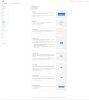
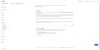
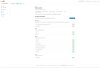
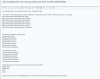
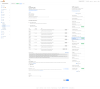
I opened the file (.htaccess) and found that Safari was not cached. But why is it still stuck in the cache on my phone and iPad?
Now I am confused and can't solve the problem.
-------------------------------------
# BEGIN LSCACHE
## LITESPEED WP CACHE PLUGIN - Do not edit the contents of this block! ##
<IfModule LiteSpeed>
RewriteEngine on
CacheLookup on
RewriteRule .* - [E=Cache-Control:no-autoflush]
RewriteRule litespeed/debug/.*\.log$ - [F,L]
RewriteRule \.litespeed_conf\.dat - [F,L]
### marker ASYNC start ###
RewriteCond %{REQUEST_URI} /wp-admin/admin-ajax\.php
RewriteCond %{QUERY_STRING} action=async_litespeed
RewriteRule .* - [E=noabort:1]
### marker ASYNC end ###
### marker NOCACHE USER AGENTS start ###
RewriteCond %{HTTP_USER_AGENT} Mobile\.\*Safari|MobileSafari|Safari [NC]
RewriteRule .* - [E=Cache-Control:no-cache]
### marker NOCACHE USER AGENTS end ###
### marker CACHE RESOURCE start ###
RewriteRule wp-content/.*/[^/]*(responsive|css|js|dynamic|loader|fonts)\.php - [E=cache-control:max-age=3600]
### marker CACHE RESOURCE end ###
### marker LOGIN COOKIE start ###
RewriteRule .? - [E="Cache-Vary:,wp-postpass_c9a26e720a93e7156593474fb6cbebcc"]
### marker LOGIN COOKIE end ###
### marker DROPQS start ###
CacheKeyModify -qs:fbclid
CacheKeyModify -qs:gclid
CacheKeyModify -qs:utm*
CacheKeyModify -qs:_ga
### marker DROPQS end ###
</IfModule>
## LITESPEED WP CACHE PLUGIN - Do not edit the contents of this block! ##
# END LSCACHE
# BEGIN NON_LSCACHE
## LITESPEED WP CACHE PLUGIN - Do not edit the contents of this block! ##
### marker BROWSER CACHE start ###
<IfModule mod_expires.c>
ExpiresActive on
ExpiresByType application/pdf A86400
ExpiresByType image/x-icon A86400
ExpiresByType image/vnd.microsoft.icon A86400
ExpiresByType image/svg+xml A86400
ExpiresByType image/jpg A86400
ExpiresByType image/jpeg A86400
ExpiresByType image/png A86400
ExpiresByType image/gif A86400
ExpiresByType image/webp A86400
ExpiresByType video/ogg A86400
ExpiresByType audio/ogg A86400
ExpiresByType video/mp4 A86400
ExpiresByType video/webm A86400
ExpiresByType text/css A86400
ExpiresByType text/javascript A86400
ExpiresByType application/javascript A86400
ExpiresByType application/x-javascript A86400
ExpiresByType application/x-font-ttf A86400
ExpiresByType application/x-font-woff A86400
ExpiresByType application/font-woff A86400
ExpiresByType application/font-woff2 A86400
ExpiresByType application/vnd.ms-fontobject A86400
ExpiresByType font/ttf A86400
ExpiresByType font/otf A86400
ExpiresByType font/woff A86400
ExpiresByType font/woff2 A86400
</IfModule>
### marker BROWSER CACHE end ###
## LITESPEED WP CACHE PLUGIN - Do not edit the contents of this block! ##
# END NON_LSCACHE
# BEGIN WordPress
# The directives (lines) between "BEGIN WordPress" and "END WordPress" are
# dynamically generated, and should only be modified via WordPress filters.
# Any changes to the directives between these markers will be overwritten.
<IfModule mod_rewrite.c>
RewriteEngine On
RewriteRule .* - [E=HTTP_AUTHORIZATION:%{HTTP:Authorization}]
RewriteBase /
RewriteRule ^index\.php$ - [L]
RewriteCond %{REQUEST_FILENAME} !-f
RewriteCond %{REQUEST_FILENAME} !-d
RewriteRule . /index.php [L]
</IfModule>
# END WordPress
# BEGIN LiteSpeed
# The directives (lines) between "BEGIN LiteSpeed" and "END LiteSpeed" are
# dynamically generated, and should only be modified via WordPress filters.
# Any changes to the directives between these markers will be overwritten.
<IfModule Litespeed>
SetEnv noabort 1
</IfModule>
# END LiteSpeed
# MalCare WAF
<IfModule LiteSpeed>
php_value auto_prepend_file '/home/runcloud/webapps/ShopCHwebsite/malcare-waf.php'
</IfModule>
<IfModule lsapi_module>
php_value auto_prepend_file '/home/runcloud/webapps/ShopCHwebsite/malcare-waf.php'
</IfModule>
<Files ".user.ini">
<IfModule mod_authz_core.c>
Require all denied
</IfModule>
<IfModule !mod_authz_core.c>
Order deny,allow
Deny from all
</IfModule>
</Files>
# END MalCare WAF

 339.1 KB Views: 4
 381.5 KB Views: 4